
How We Release Updates
Quality Window is delivered through a combination of major releases and follow-up patches.
Major releases include new features, enhancements, and bug fixes. Patches are released as needed to address issues across the product and maintain stability and performance.
Each release entry represents the latest cumulative build for that version. Installing the most recent build ensures you receive all updates and fixes available.
Review release notes to determine when an upgrade is appropriate, especially if you are addressing a specific issue.
Overview – Quality Window 6.1.377
- Major release: 6.1.352
- Subsequent builds: 6.1.357, 6.1.358, 6.1.364, 6.1.365, 6.1.376
- Current build: 6.1.377
Version 6.1.352 introduced a major update focused on strengthening Rules and Alarms, improving QW Workstation performance, and refining overall system behavior.
Subsequent builds deliver fixes and improvements across the product based on ongoing use and feedback.
Installing 6.1.377 provides both the original feature updates and all subsequent fixes in a single, stable build.
New Features and Improvements (6.1.352)
Major Update: Improved Rules and Alarms Workflow
This release delivers a major improvement to how Rules and Alarms work in Quality Window, making alarms clearer, more actionable, and easier to manage for both operators and administrators.
Operators now receive immediate and unambiguous feedback when a rule violation occurs. When configured, alarms can block additional data entry until the issue is acknowledged and a comment or corrective action is provided, ensuring corrective actions are captured at the time the condition occurs. If the last record is edited and triggers a rule, the same acknowledgement requirement applies. Visual indicators clearly distinguish between informational alarms and alarms that require action, reducing confusion and missed responses.

Example of Rule and Alarms being Disabled
For administrators, alarm behavior is now more predictable and configurable. Acknowledgement requirements and email notifications can be enabled independently per rule, allowing teams to determine which conditions simply notify and which enforce workflow. Email notifications are triggered per event when configured. New tokens are available for acknowledgement events. Alarm history is preserved and available through reporting to support audits and investigations.
Overall, this update is designed to move alarms from background notification to an enforceable part of the operational workflow.
For setup details and configuration guidance, see the updated Rules and Alarms – Administration Guide.
Other Features and Improvements
QW Workstation Load Performance Improvements – Performance has been improved when opening QW Workstation, QW applications, and Views in QW Workstation.
QW Workstation Progress indicator Improvements – As part of the performance updates, the QW Progress indicator has been optimized to appear more consistently during long operations and to improve visibility when opening QW applications.
Ability to Disable Alarms – Rules and Alarms can now be disabled for the entire deployment in QW Admin for customers that do not use this functionality. Disabling Rules and Alarms also disables the related enforcement behaviors introduced in this release.
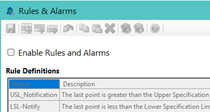
Example of Rule and Alarms being Disabled
Temporary views restrict record creation – When a View or filter has unsaved changes, Add, Insert, and Copy actions are disabled. A notification banner and status bar entry explain that the View must be reloaded to re-enable these actions, with guidance to save the View first if needed. This behavior is a direct consequence of the new alarm enforcement capability and is disabled if Rules and Alarms are disabled at the deployment level.

Updates to View Manager – The View Manager has been updated to improve clarity of operation. The Run button now displays either “Load” or “Preview” to clearly indicate the action being performed based on the current state of the View. “Load” appears when an existing View is selected, while “Preview” appears when filters or configuration have been modified.
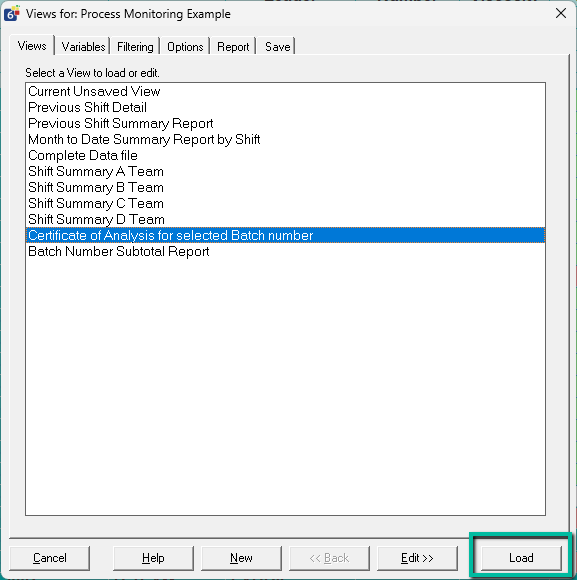 Example of Load Button when Existing View selected | 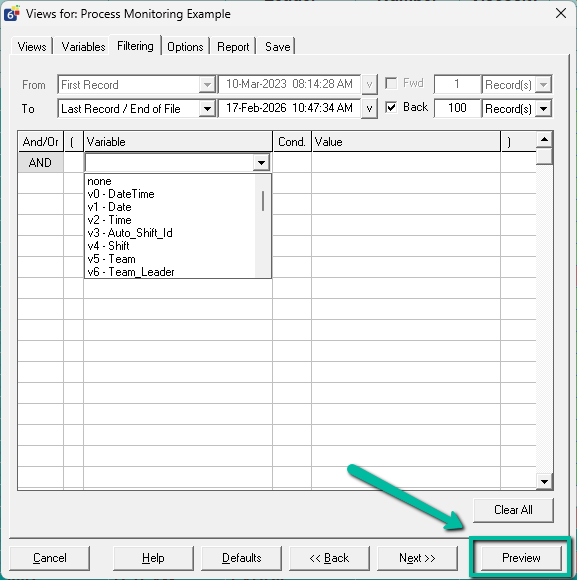 Example of Preview Button when changing view/filters |
Save and Load button in View Manager – To improve usability when saving and loading Views, a new Save and Load button has been added to the Save tab, allowing users to save the currently configured View and load it in a single action. The existing Save button has been preserved to allow saving without closing the View Manager, supporting the creation of multiple Views with different settings.
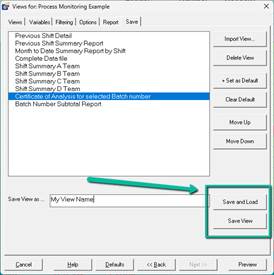
New background worker – This release introduces a new core component of the Quality Window platform called QW.AgentService. QW.AgentService starts automatically when QW starts and runs in the background to offload certain system tasks from the main application.
Improved Security Users Import/Export – The Import and Export file format has been updated to include a previously missing QW Admin permission and to better align with the permission labels displayed in Security Administrator. See details in the Security Guide.
Resolved Issues 6.1.377
View Report Settings in Default View not respecting settings – An issue has been resolved where, if no default view was defined in the application, changes made to Report tab settings were not fully applied in generated reports. Reports now correctly reflect the configured settings even when a default view is not explicitly set.
Resolved Issues 6.1.376
Reinstated Multiple Variable Delete in QW Admin – The ability to delete multiple variables at once in QW Admin has been restored, allowing administrators to manage variables more efficiently.
QW Admin changes could break view filters – An issue has been resolved where structural changes in QW Admin, such as deleting variables or changing their positions, were not reflected in existing view filters. This could result in invalid filter references and, in some cases, cause QW Workstation to crash. Filters tied to deleted variables are now automatically removed, and remaining filters are remapped to align with updated variable positions.
Save As did not enforce proper file extensions – An issue has been resolved where using Save As in QW Admin without specifying a valid file extension could result in a failed or partial save. File extensions are now handled correctly.
New Message Log incorrectly prompted for filename – An issue has been resolved where selecting New in the Message Log incorrectly prompted the user to save a file. The action now clears the contents without prompting.
File Pack failed when Command to Execute was defined – An issue has been resolved where the File Pack utility would fail if an application included a Command to Execute reference. This scenario is now handled correctly.
Search filter did not include view names in DIR mode – An issue has been resolved where the Open Application search filter did not include view names when launching via a DIR file. Filtering now works as expected.
Corrupted limits could cause application crash – An issue has been resolved where invalid or corrupted limits could cause QW Workstation to crash on open. These conditions are now automatically corrected.
Popup field length conflicts blocked saving – An issue has been resolved where mismatched field lengths between popup definitions and referencing variables could prevent saving in QW Admin. A validation check now allows users to resolve the issue or apply an automatic correction.
Invalid characters in popup definitions caused validation loop – An issue has been resolved where certain invalid characters in popup descriptions could trigger an infinite validation loop. This behavior has been corrected.
Variable Reference Panel not showing all references – An issue has been resolved where the Variable Reference Panel did not display all references in some cases. References now display correctly.
Variable Reference Panel column headers confusing – Column headers in the Variable Reference Panel have been updated to improve clarity.
Change highlight lost after validation failure – An issue has been resolved where yellow highlights indicating unsaved changes were lost after a failed validation attempt. Highlights are now preserved.
Resolved Issues 6.1.365
Double quotes in variable filter values causing view load failure – An issue was identified where views would fail to load if a variable filter contained double quotes within the filter value. This resulted in an error when attempting to open the view. This issue has been resolved, and views now load correctly when filter values include double quotes.
Resolved Issues 6.1.364
Popup Editor Crashes – This release resolves several crash scenarios reported by customers when using the Popup Editor. These issues could occur intermittently during normal editing operations and have been corrected to improve stability.
Popup Editor not prompting to save on open – When opening a popup in the Popup Editor, users were not prompted to save existing unsaved changes before another popup was opened, creating a risk of losing work. The editor now detects unsaved changes and prompts users to save before allowing another popup to be opened.
Auto Lookup mapping when connected to external data – When a QW Application was configured to retrieve data from an external data source, newly added lookup variables were not being populated correctly. This issue has been resolved.Popup file associations – Popup file associations with the Quality Window Popup Editor were not functioning as expected. This issue has been resolved so popup files now correctly open with the Popup Editor.
Resolved Issues 6.1.358
Alarm Comment field not visible in low screen resolutions – An issue has been resolved where the comment field could become hidden when Quality Window was used at low screen resolutions and/or with large display scaling, preventing users from acknowledging alarms. This issue has been corrected. As part of this change, the minimum supported display setting for Quality Window is now 1024 × 768 resolution with up to 100% scaling.
Resolved Issues 6.1.357
Editing Last Record re-triggers Alarms – An issue has been resolved where editing the last record would re-trigger alarms even if the value that originally caused the alarm was not changed. Alarms will now only trigger on edit when the relevant value has actually changed.
Adding Text Variable in View converts it to Numeric – In some cases, adding or inserting a text variable into a View incorrectly converted the variable type to numeric, causing the View to become read-only. This issue has been resolved. Quality Window now detects this state, automatically corrects the variable type at runtime, and allows users to optionally save the View to make the correction permanent.
Read-only View Reason displaying incorrect variable number – The read-only reason message incorrectly displayed the base application variable number instead of the View-specific variable number. This has been corrected to display the appropriate variable number for the View.
Alarm Trigger Notification not being sent – In some cases, if a user acknowledged an alarm immediately after it was triggered, only the acknowledgement notification was sent and the original alarm notification was not delivered. This issue has been resolved.
Resolved Issues 6.1.352
Clearing all Variables in view results in read-only state – An issue has been resolved where clearing all variables in a View in View Manager caused the Date and Time field lengths to be incorrectly set to 10 instead of 8, resulting in the View becoming read-only.
Custom Date filters crashing QW Workstation – QW Workstation could crash in some cases when users entered a custom “where” filter using date and time fields. This issue has been resolved.
Loading Views from Views Manager can Crash – A rare issue has been resolved where loading a View in View Manager could cause Quality Window to crash.
Localization issue in QW Admin – Depending on the selected Windows region, QW Admin did not properly handle different decimal separators such as commas and would prevent saving of changes. QW Admin now correctly supports different regional numeric settings.
Rename QW Application Error – An issue was fixed in QW Admin where renaming a QW Application resulted in an error, and the transaction log file was not renamed properly.
Save View as throws error – In QW Workstation, in some cases when using the Save View As feature to save the current View as a distinct application, an error occurred preventing the QW Application from being created. This issue has been resolved.
Output file writing issue in views – When a View was loaded and a user edited a record that was not the last record in the current View, the output file was updated contrary to the intended design. This has been corrected.
SumStat Script Updated – A new version of the QWSumStat.qwx6 file has been included in this release to resolve several issues with report generation. Customers using SumStat who wish to deploy this update should contact support for guidance before replacing the file in their Shared Configuration.Non-Fatal Exception resolved – A non-fatal exception was being written to QW error logs unnecessarily, resulting in unneeded log entries. This has been corrected.
2025-10-27 | Build 6.1.271 & & 6.1.273
These releases deliver major enhancements to the Report Documents feature, focused on reducing setup time for administrators and improving usability for end users. Key updates include support for landscape orientation, default fonts, image-enabled table cells, advanced formatting tools, and a new filterable Report Document list for easier access in large applications. Several issues were also resolved to improve reliability and performance when editing, exporting, and managing Report Documents. Version 6.1.273 was released shortly after 6.1.271 to address additional customer needs. Given the proximity of the two releases, the notes have been combined, with items specific to 6.1.273 explicitly identified.
New Features and Improvements
Report Document Improvements
Report Document Landscape Orientation – Report Documents can now be set to landscape or portrait using a new property in the Properties dialog.
New Default Font for Report Documents – Administrators can now set a default font for a Report Document, which automatically applies to all newly created elements to ensure consistent branding.
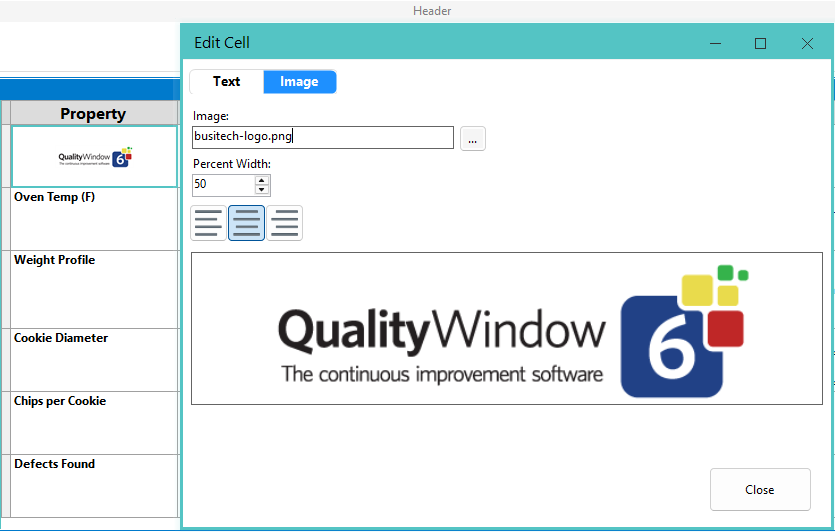
Add Images to Table Cells – Table cells can now contain either an image or text. This allows administrators to enhance the visual layout of Report Documents. Note: a single cell cannot contain both text and an image.
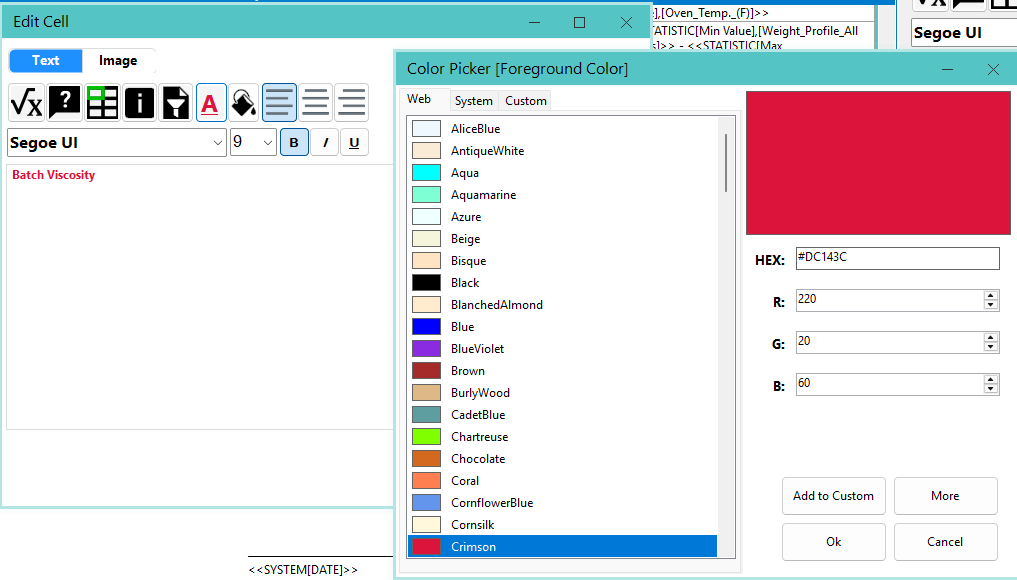
New Formatting Experience in Report Documents – Administrators now have expanded styling controls, including a new font selection interface and support for font and background colors in text and table cell elements.
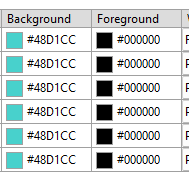
Header Column Color Control – Column header background and font colors can now be controlled independently for greater design flexibility.
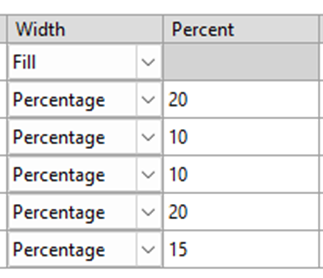
Column Width Settings – Columns now support two width settings: Fill and Percentage. Percentage mode allows precise column sizing, while Fill mode ensures columns automatically occupy remaining space. Multiple Fill columns share the remaining width equally.
Advanced Table cell selection
The table element now supports row, column, and multi-cell selection enabling Report Document authors the following capabilities:
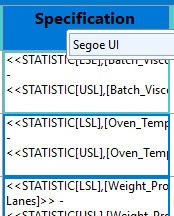
Bulk Styling – Apply styles and formats to multiple cells at once with a new floating toolbar enabling authors to apply text font, font size, alignment, font colors, and background colors across multiple cells, entire columns, or rows.

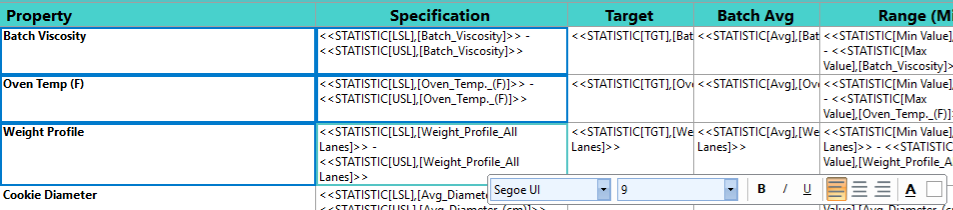
Selection Deletion – Easily clear the contents of multiple cells or delete entire columns or rows when selected using the row selector or column header and pressing the Delete key on the keyboard. Selecting cells and pressing Delete clears cell contents. Selecting a row by clicking the row selector on the far left deletes the entire row. Selecting a column header deletes the entire column.

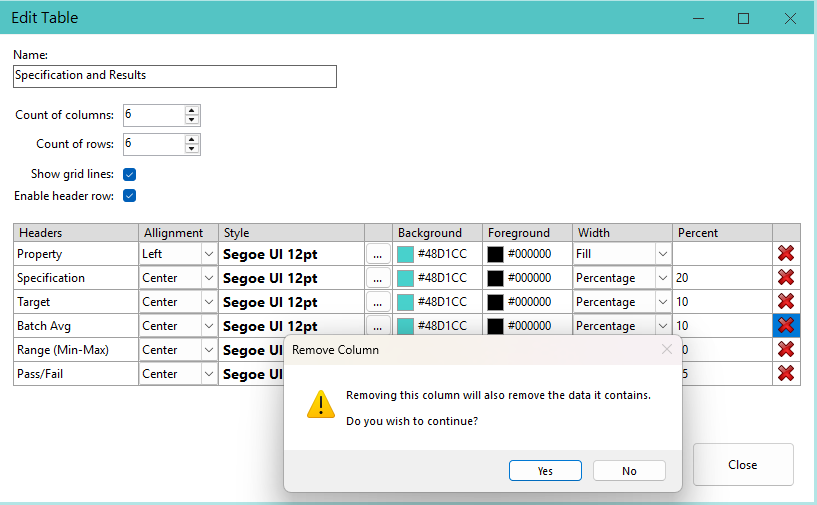
Column Header Deletion – Authors can now also delete columns by deleting the column header directly in the Table Properties editor.
Selection Copy, Cut, Paste – Keyboard clipboard features have been added to the table when selecting multiple cells, entire columns, or rows. At this time, clipboard menu access is not available.
| Keyboard Command | Result |
|---|---|
| CTRL + C | Copy selection and formatting into the clipboard. |
| CTRL + X | Cut selection and formatting into the clipboard. |
| CTRL + V | Paste clipboard contents into the current selection |
| CTRL + SHIFT + V | Paste text values only (preserves existing formatting) |
Clipboard Rules:
- If the contents of the clipboard have more cells than the target selection, the contents will be pasted into adjacent cells to include all copied data.
- If the target selection is larger than the clipboard contents, the contents will repeat left-to-right and top-to-bottom.
- Formatting is always copied during Copy/Cut operations unless using CTRL + SHIFT + V.
Workstation Report Document Improvements
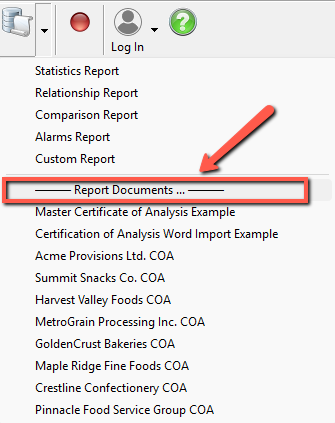
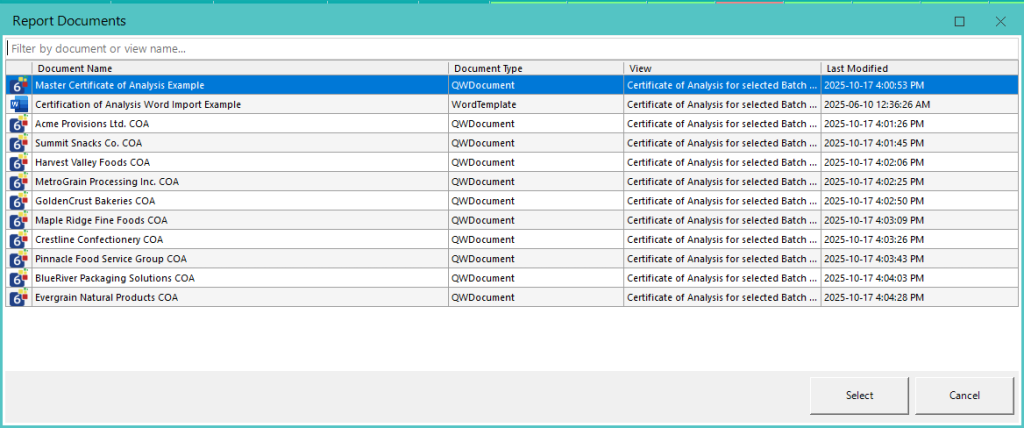
Report Documents List Dialogue – In this release, and in response to customers creating a large number of Report Documents for a single QW Application, a new dialog has been added, accessible through the “—- Report Documents … —-” menu option. The first ten items continue to appear in the dropdown list, while all Report Documents are now accessible through a new filterable dialog, allowing users to quickly locate the document they need.
Resolved Issues – 6.1.271
Exported Report Document Error on Edit – Resolved an issue where exporting a Report Document that referenced a view not present in the target QW Application caused an error and unexpected application closure when saving document properties.
Report Document Column Header Edit Error – Resolved an issue where editing a column header text would cause an error if a new column was added to a table element and its alignment had not been set.
Report Document System Value Dialogue Search Not Working – Resolved an issue where the search function in the System Value Dialogue was not operational.
Issue with Deleting Last Report Document – Resolved an issue in QW Admin where deleting the last Report Document in an application caused an error and unexpected closure.
Shared Configuration Auto-Creation of File Issues – Resolved an issue where missing shared configuration files were not being fully recreated when users attempted to auto-provision them.
QW Audit Log Conflict Not Working in All Conditions – Resolved an issue where, during detection of a log file location conflict, QW did not correctly copy the log file if a file already existed at the destination.
Resolved Issues – 6.1.273
SDK InsertRecord Not Inserting in the Right Location – Resolved an issue in the QW SDK where, in some cases, using the QWAccess.InsertRecord method caused records to be inserted out of order, resulting in an out-of-sequence record set.
QW Admin Refresh Application Fix for Out-of-Sequence Records – Resolved an issue in QW Admin where the Refresh Application function did not properly correct out-of-sequence records in some rare cases. This feature now restores the correct record order.
2025-08-15 | Build 6.1.260
New Features and Improvements
Custom Properties Update – Variable reference fields are now labeled Custom Properties, allowing administrators to define and manage custom metadata for any variable in an application. When a new property key is added, it appears automatically across all variables—no manual setup needed. The legacy XRef and Category fields are included by default and cannot be removed. Custom property keys support spaces and are case-insensitive.
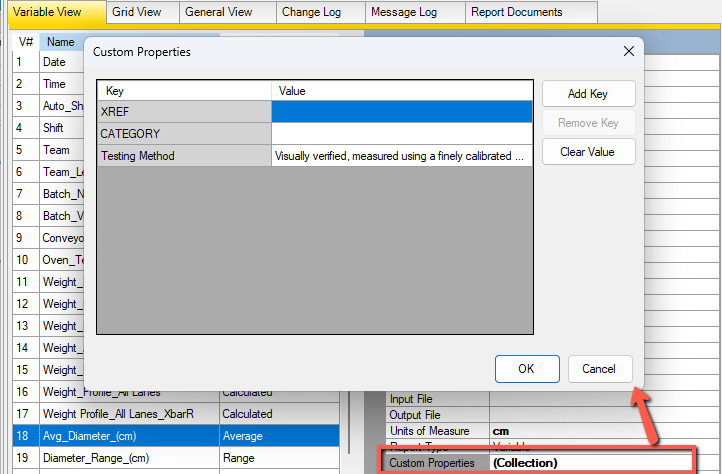
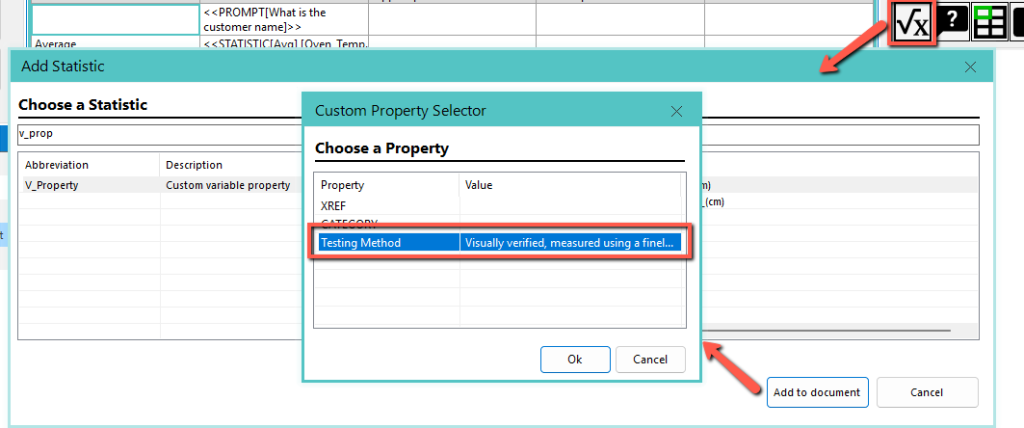
Custom Property Support in Report Documents – Report Documents now support outputting custom properties, allowing standardized content generation per variable. Use the V_Property statistic, select the desired variable, and choose the custom property to include.
Conditional Output in Text Elements – You can now use the <<IF>> function in text elements to conditionally display content based on variable values, user prompts, or system values. Supports numeric and string comparisons, with modifiers like \* upper for case-insensitive checks. Ideal for adding dynamic messages or conditional labels without needing multiple templates. See the full Report Documents feature guide for details.
<<IF {FIELD NAME}, {OPERATOR}, {COMPARISON VALUE}, {TRUE TEXT}, {FALSE TEXT}>>
Advanced Formatting via Formatting Codes – This release introduces support for advanced text formatting, including text highlighting, font attributes, and cell background colors, applied to specific parts of a report document. These features are available through formatting codes only; a user interface will be added in a future release based on customer feedback and usage patterns. See the full Report Documents feature guide for details.
Resolved Issues
Lookup Unable to Reference Calculated Fields – Resolved an issue where calculated fields could not be used as the Variable Key to Popup File, preventing them from driving lookup values.
Custom Property Changes Not in Change Log – Fixed an issue where edits to custom properties (formerly reference fields) were not being recorded in the Admin change log.
QW RS-232 Admin getting locked – An issue was resolved where when a user gives focus to the find text, text box the application would become locked and not respond to user interactions.
2025-07-30 | Build 6.1.254
This update improves QW Admin performance, fixes key bugs, and adds new features for Views, data entry, and alarm handling. Report Documents now support duplication, export, macro-enabled Word files, and better table formatting. View-based record entry is more controlled, and UI changes improve clarity and workflow across the board.
New Features and Improvements
Disable Admin Change Messages – QW Admin now includes an option to disable the notification shown to users when an application is changed by an administrator. This is a global setting that affects all QW Applications. By default, it is enabled. Disabling it only affects future admin changes; any messages already queued will still be shown. You can change this setting under Window -> Settings… by unchecking Notify Users of Admin Changes.
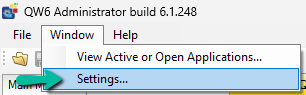 QW Admin Setting for Admin notifications | 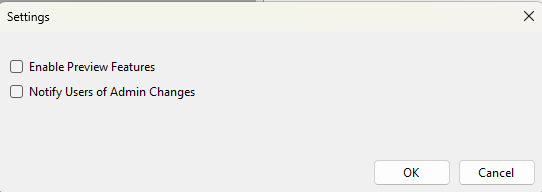 QW Admin Setting for controlling Admin notifications QW Admin Setting for controlling Admin notifications |
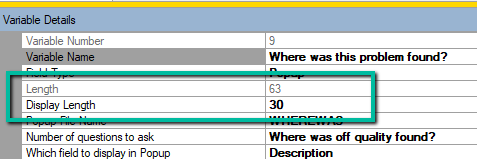
Display Length for Text Fields – Building on the existing display length support for popup and lookup fields, Text variables can now define a custom display length. This allows admins to optimize the logsheet layout. Display length must be less than or equal to the variable’s total length. If a larger value is entered, it will automatically be trimmed. This update also fixes an issue where display length was previously being misapplied.
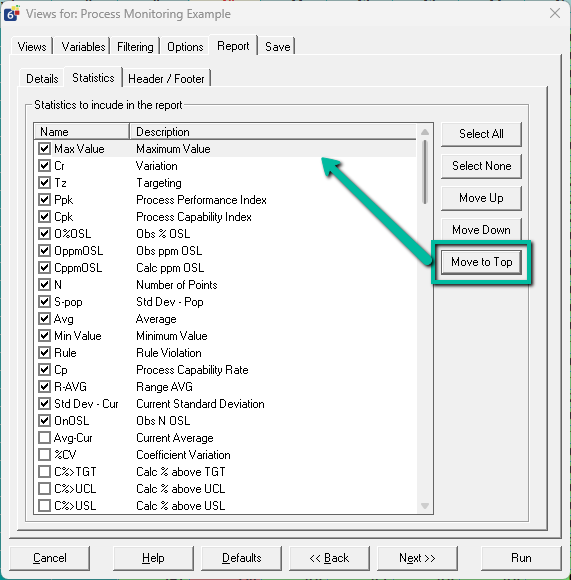
Move to Top – View Report Statistics Button – A new Move to Top button has been added in the View Manager, allowing users to reorder statistics in View Reports more easily by pushing a selected statistic to the top of the list.
Clearer Average Data Entry Label – The label for average variable’s data entry now more clearly prompts users by displaying: “Enter [Count] values to Average“ instead of the generic “Raw Data,” improving clarity for average-type variables.
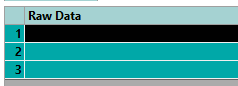 Old Data Entry Label for Average Variables | 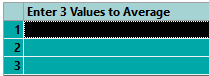 New Data Entry Label for Average Variables |
Auto Resize of Add Screen Columns – Data entry columns on the Add screen now auto-resize to fit available space. If the variable names are short, the columns will use less than 50% of the panel. If they’re long, the layout caps at 50% to maintain readability and usability.

Alarms show Notification Errors – When an alarm fails to trigger a notification (e.g., due to an invalid address or server error), an error entry is now shown in the alarm list with details for immediate troubleshooting.

Save Button Disabled after click – The Save button (and other Add screen controls) are now disabled once clicked, providing clear feedback that the save operation is in progress.
Contextual Add Record with Views – When adding records using a View, Quality Window now ignores input file values for variables that are not part of the View. This ensures that only the variables included in the View contribute to the new record, even if other variables have input mappings defined in the application.
QWAdd.exe Supports Adding by View – The QWAdd.exe automation utility now accepts a View name as part of the template path, allowing it to collect only the variables defined in that View. This provides integrators with fine control over which data points are collected at what time during the manufacturing process.
Example: C:\Program Files (x86)\Busitech\QW6\QW6Add.exe “C:\Busitech\My QW Application.QWT|My View Name”
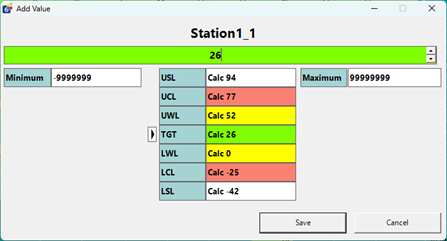
New Input Form in SDK – A new single-variable input form is now available in the SDK for custom solutions. This form enables a streamlined, single-cell editing experience. If you’re interested in using this in your deployment, please contact Busitech to discuss options.
Report Documents (Certificate of Analysis) Improvements
We’ve implemented several enhancements to the new Report Documents feature based on customer feedback. For full details, refer to the updated Report Documents Admin Guide.
Duplicate Document – You can now duplicate an existing document to make minor edits for different audiences without starting from scratch.
Export Documents – Share Report Documents across QW Applications with just a few clicks. Build once, reuse many times.
Macro-Enabled Word Document Support – Added support for importing and generating .docm (macro-enabled Word) files.
Set Default Export Format – Admins can now set the default output format (PDF or Word) for generated documents. Users can still change the format at generation time.
View Filters – Insert filter prompt values directly into the document using the new View Filters button in the editor.
 New View Filters Toolbar button | 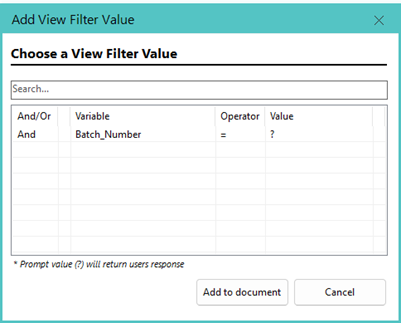 View Filter Value Token Chooser Dialogue |
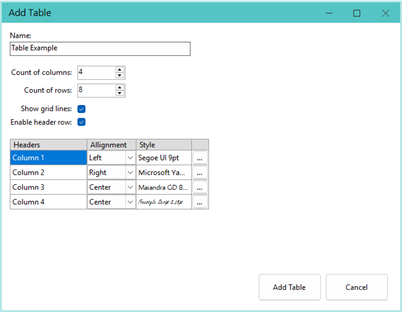
Table Header Row Editor – The table editor now includes a Header Row Editor, allowing you to customize header labels, alignment, and font style for each column individually.
Resolved Issues
QW Admin performance issues – Resolved a slowdown when saving large applications containing many popup variables linked to large popup databases. Saving and updating QW Application files should now be significantly faster when these conditions exist.
Duplicate variable no longer appending incremental suffix – Fixed an issue where QW Admin stopped appending “_#” to duplicated variable names. The automatic suffixing behavior has been restored.
Filters using Beginning and End incorrectly flagged records – Fixed a bug where filters set to “From Beginning of XXX” and “To End of XXX” displayed inaccurate validation messages for records with valid datetimes. This now behaves as expected.
Filters on Date field may crash application – Resolved a crash caused by applying a variable-specific filter to a date field in Quality Window.
Protected/Required fields not updating in Views – Addressed an issue where updates to “Protected” or “Required” field properties in QW Admin were not reflected in Views if the values remained the same.
Unexpected error when opening a second script – Fixed a crash that could occur when opening a second script in the same QW Admin session.
Move or Save As fails with external references – Resolved a crash when attempting to move or save a QW Application that includes an external reference (e.g., DDE, OPC, or DataHub) for input/output files.
Annotated fields not respected in Summary Views – Fixed a bug where Summary Views ignored the Annotated and X/Y Axis settings from the QW Application configuration.
Audit Log crashing when columns missing – Older audit logs missing newer columns were causing crashes in the Audit Log Viewer. This issue has been resolved.
2025-06-10 | Build 6.1.234
This release introduces major improvements in document generation, popup usability, and performance.
The new Report Documents feature makes it easy to create Word or PDF reports—like Certificates of Analysis—with embedded QW data and statistics, no mail merge setup required.
Popup variable handling is now smarter, with automatic length sizing, layout control via Display Length, and level-specific filtering during data entry.
Significant audit log performance upgrades reduce log bloat and improve speed when loading or editing large record sets.
Additional updates include refined view security, CSV user import, clearer OPC address formats, and enhanced Views Manager tools for more precise variable control.
New Features and Improvements
New Report Documents Feature for Certificates of Analysis and More
Busitech introduces a powerful new way to generate report documents—such as Certificates of Analysis (COAs) or other Word/PDF files—that incorporate Quality Window (QW) data and industry-leading statistics. With a single click, users can now export QW data into documents without needing to configure merge codes or Word mail merge fields—though those options remain available. Learn more in the Report Documents Feature Guide.
Popup Improvements
Popup Variable Length Improvements – Popup variables now automatically set their appropriate length. A new Display Length property has been added that controls how wide the column appears in the Logsheet, helping balance field visibility and layout without risk of truncation.
Popup Level Filtering – A new filter text box lets users filter the current popup level when adding or editing a record. This only filters the current level; child values still require a user selection to then filter further.
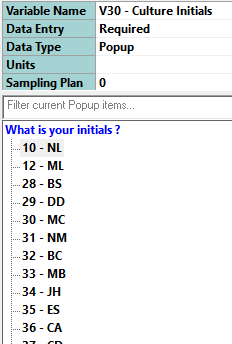 Unfiltered Popup Selection | 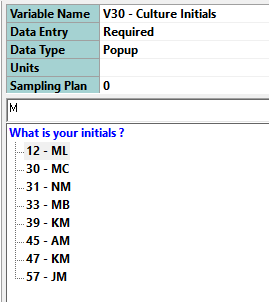 Filtered Popup Selection |
Security and Traceability Improvements
Security Permission Label Update – The permission in QW Security Administration is now labeled “Allow Views Management.” This more accurately reflects its function: it governs only the ability to create, update, or delete views. It does not restrict access to filters.
Workstation Toolbar Experience Update (Views/Filter) – The Filter and Views buttons in the QW Workstation toolbar have been refined for clarity and usability. The Filter button now only shows filter options and is always accessible—it never prompts for permissions. View management functions are available only via the Views button or Views Manager sub-button.
Import Security Users – The Security Administration console now supports importing user lists from CSV files. If a user already exists, the administrator is prompted to update or skip the record.
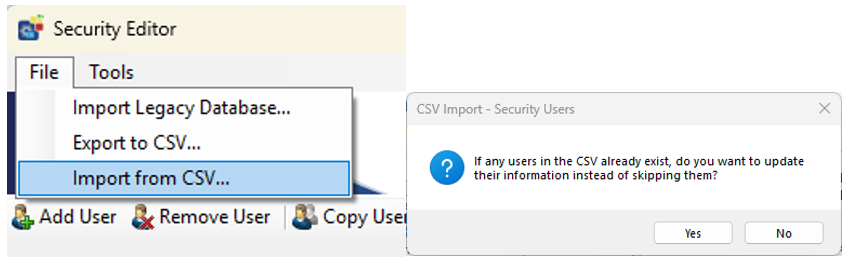
Protections Against Security Lockout – The system now prevents configurations that would lock out the security administrator. A warning appears if such a setup is detected.
Transaction Audit Log – Performance Improvements – Optimizations improve performance when viewing large record sets and editing older records. Unnecessary entries related to recalculations have been eliminated. Admins can optimize logs using the File → Refresh Application option.
Admin Log Entry for Application Creation – A log entry is now added when an admin creates a new QW application, helping track when and where it originated.
Other QW Administrator Improvements
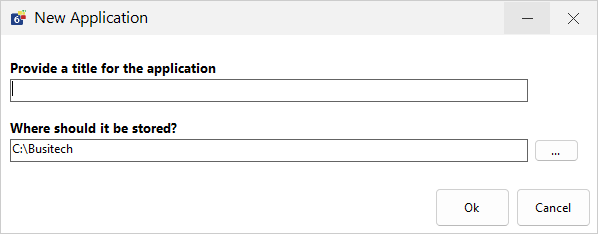
New Application Dialogue – A redesigned interface makes it easier to name new applications and select their storage location when creating them.
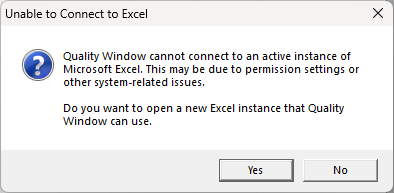
Excel to QW Importer – User Context Support – This utility can now launch Excel under the same user context as Quality Window, resolving access issues in secure or restricted environments.
Shared Spec Manager Configuration – The Spec Manager’s list of applications is now stored in the shared configuration folder, allowing easy access across admin users.
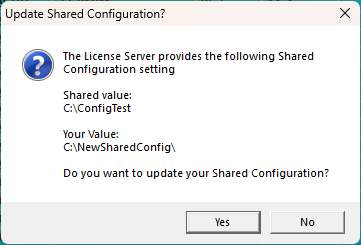
Auto-Provisioning of Shared Configuration and Data Folders – When connecting to a QW License Server, users are now prompted to set shared folders if their configuration differs from the setup provided by the license server.
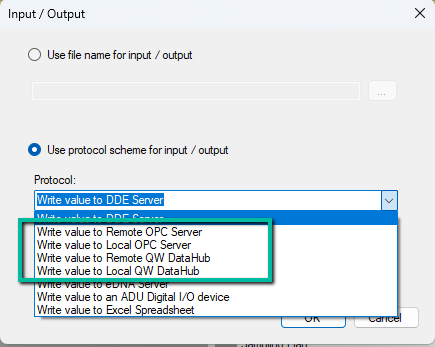
Improved Input/Output File Integration – Input/output protocol setup now supports distinct address formats for OPC Classic and renames “QWIOServer” references to QW DataHub.
| Local OPC Address: | OPC://{Node}/{ProgID}/{TagName} |
| Remote OPC Address: | OPC:/{ProgID}/{TagName} |
|Note: OPC UA is supported only via QW DataHub 6.1, not directly by Quality Window.
QW Workstation Improvements
Insert Variable in View Manager – A new Insert button has been added to the Variables tab in the Views Manager, making it easier to add one or many variables at a specific position within a view with a single click. This allows view managers to insert variables directly where needed without relying solely on Move Left or Move Right actions.
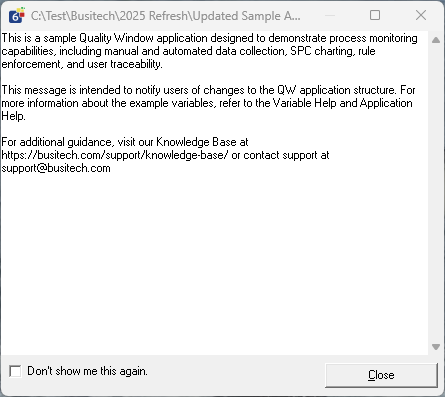
User Message Log Improvements – The log shown after QW application changes now wraps long lines and includes a close button for easier dismissal.
Resolved Issues
Replace Variable in View Manager Fixed – Previously, when users used the Replace button on the Variables tab in the Views Manager, the newly selected variable would not inherit all the correct variable properties. This issue has now been resolved.
Transaction Log Viewer showing “No Transaction History” – Fixed an issue where the transaction info bubble did not show data for the selected row.
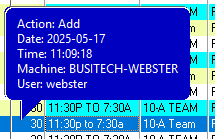
Login Dialogue Missing from Start Bar – The login prompt now forces an icon to appear on the taskbar, making it easier to locate if hidden.
Root Folder Storage Error – Fixed a bug where storing a QW application at the root of a drive could cause the app to crash.
View Overflow Error – Resolved an “overflow” error that appeared with certain view configurations on load.
View Manager Replace Variable Specification Issue – When using the Replace Variable button on the Variables tab in the Views Manager, the new variable would incorrectly inherit the process limits of the variable it replaced. This issue has now been resolved.
2025-04-07 | Build 6.1.208
This update introduces significant improvements to user management and the overall login experience, alongside enhanced log file handling. Key usability upgrades help administrators manage system resources more effectively while offering a clearer, more intuitive interface for end users. Several critical bugs have also been resolved, improving data integrity, application stability, and scripting reliability.
New Features and Improvements
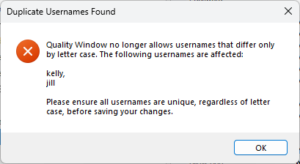
Usernames are now case-insensitive – To reduce user confusion and align with security best practices, Quality Window no longer distinguishes usernames based on letter case. While duplicate usernames with different casing can still log in, administrators will be blocked from editing the security configuration until the duplicated username conflicts are resolved.
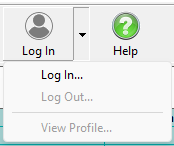
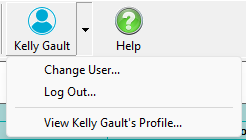
Improved login visibility – Toolbar and menu updates now provide a clearer indication of when a user is logged in. Visual cues include a distinct toolbar button color and display of the full user name, enhancing transparency and usability.
Automatic log file archiving – To reduce disk usage on systems with limited storage, Quality Window now compresses and archives the previous day’s logs and maintains only the last 10 days of log files.
Resolved Issues
Security Variable not updating on edit – Fixed an issue where editing a record did not properly update the user assigned to the configured Security Variable. The correct user is now recorded in both the audit trail and data record’s security variable (if configured).
Crash on short IO filenames – Resolved an issue where QW Admin would crash if an input or output file had fewer than 3 characters in its name.
Crash when using #Include in scripts – Addressed a bug where using #Include in certain script contexts would prevent applications from opening.
Error when variable appears twice in a view – Fixed a bug that triggered an error when accessing Variable Information “VarInfo” via the toolbar for variables that appeared more than once in a view.
Loss of “Summarized By” settings after Admin changes – Resolved an issue where admin changes would reset the “Summarized By” configuration in views.
Incorrect variable type when summarizing Date/Time values – Fixed an issue where summarizing views that included Date or Time variables as “Last Value” incorrectly cast them as numeric.
Summarized view grouping issue – The summarize function now correctly groups all records with identical values, regardless of their sequence order.
2025-02-10 | Build 6.1.174
This patch release resolves issues affecting Excel data exchange and form input behavior. Fixes include ensuring proper import/export functionality when using flexible popups and correcting unintended checkbox selection when navigating fields with the keyboard.
Resolved Issues
Flexible Popup Excel Import/Export Issues Resolved – Addressed a problem where the flexible popup functionality interfered with Microsoft Excel import and export. The issue caused failures when popups had unbalanced levels, preventing proper use of the feature. This has now been fixed.
Enter Key Incorrectly Selecting Checkbox Fixed – Fixed an issue where pressing the enter key on the add/edit screen would inadvertently skip over a numeric checkbox field and automatically set it to checked. This behavior has been corrected to ensure accurate data entry.
2025-02-04 | Build 6.1.172
This update improves popup management, lookup administration, and application mobility. Key enhancements include Flexible Popup Structure, Move Application Feature, and streamlined lookup configuration. Fixes address filter handling, popup integrity, and stability issues, ensuring a smoother and more reliable user experience.
New Features and Enhancements
Flexible Popup Structure – Previously, hierarchical popups required full population at every level. With this update, you can now create hierarchical dropdowns without requiring every level to have child nodes, providing greater flexibility in structuring your data.
Popup Editor Default Folder – The Popup Editor now defaults to using the Data Directory configured in Shared Configuration for save and open operations. It will remember the last folder used during a session and reset to the default data directory when closed.
Move Application Feature – Administrators can now easily move an entire QW application, including associated files, to a new location. This feature, available in the Maintain Application console under File → Move Application, ensures that input, output, help, and popup files located in the same folder as the application are copied while leaving references intact to avoid disruptions to other applications.
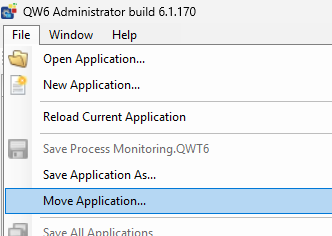 New File menu option for Move Application | 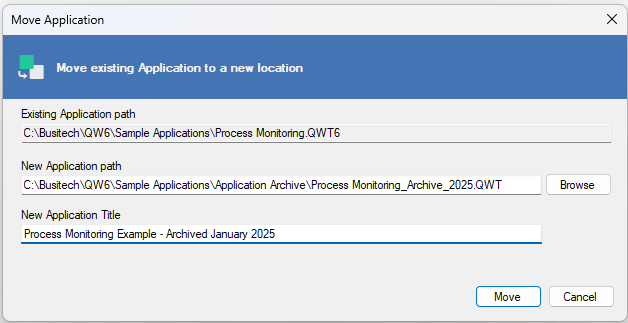 New Move Application Dialog New Move Application Dialog |
Improved Save As with Title Field – Enhancements to the “Save As” functionality now allow for more intuitive title management during the saving process.
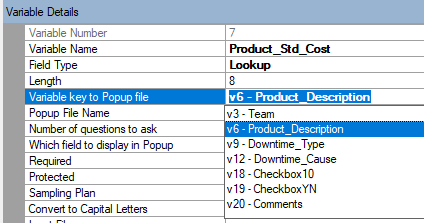
Improved Lookup Administration – The lookup experience in the QW Application Editor (Maintain Application) has been refined with the following improvements:
- The Variable Key to Popup property has been repositioned as the first popup-related property for better workflow.
- The Variable Key to Popup selection now filters the list to include only text and popup variables, simplifying configuration.
- Popup Filename and Number of Questions to Ask now auto-fill based on the selected popup, and Which Field to Display defaults to the first available field that isn’t already used.
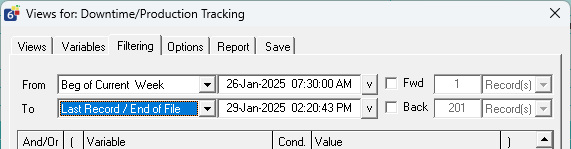
Improvements to Last Record Filter – The To: last record filter previously prevented users from saving filters when using From beginning filters due to conflicts with record ordering. The filter now automatically uses the end of the file or the current date-time, eliminating this limitation.
Resolved Issues
Improper Filter Warning After Adding a Record – A warning was incorrectly displayed in certain filter settings, stating that the added record would not be visible. This warning now only appears when appropriate.
F9 Previous Value for Popups Providing Incorrect Data – An issue with the F9 Previous Value feature sometimes caused bad data to be inserted into popup fields. This has been resolved.
Infinite Load Loop When Only Deleted Records Exist – A bug that caused an application to enter an infinite loading loop when all records were deleted has been fixed.
Variable Reference Field Changes Not Enabling Save – When modifying reference fields for variables in QW Admin, the system did not detect the change, preventing users from saving. This has been corrected.
Popup Integrity Check Improvements – Integrity and validation checks for popups and lookup variable configurations have been improved to prevent unexpected results when popups are edited in a way that invalidates existing configurations.
Popup Editor Hiding Behind Other Windows – Fixed an issue where the Popup Editor could become lost behind other windows or appear as a background task, improving usability.
Incorrect Field Progression with Enter Key on Add/Edit Screen – When users pressed Enter after entering a value in a field before a popup variable, the cursor would auto-select the popup value and skip ahead. This behavior has been corrected.
Error When Pasting Reference Variables – Resolved a crash that occurred when pasting reference-type variables (Lookup, Range) in the QW Application Editor.
Error When Deleting Certain Variables – In some rare cases, deleting popup, lookup, or range variables in QW Admin caused an error preventing deletion. This has been fixed.
Audit Logs Not Displaying New Variable Name – The Admin audit log did not properly display new variable names for variable additions. This has been corrected to ensure accurate logging.
2025-01-14 | Build 6.1.161
We’ve released Quality Window Version 6.1.161, which includes an enhanced popup selection experience in the Application Editor and addresses key issues, such as the resetting of custom view limits and unclear error messages for missing popup references. This update further enhances usability and provides clearer feedback for administrators.
New Features and Enhancements
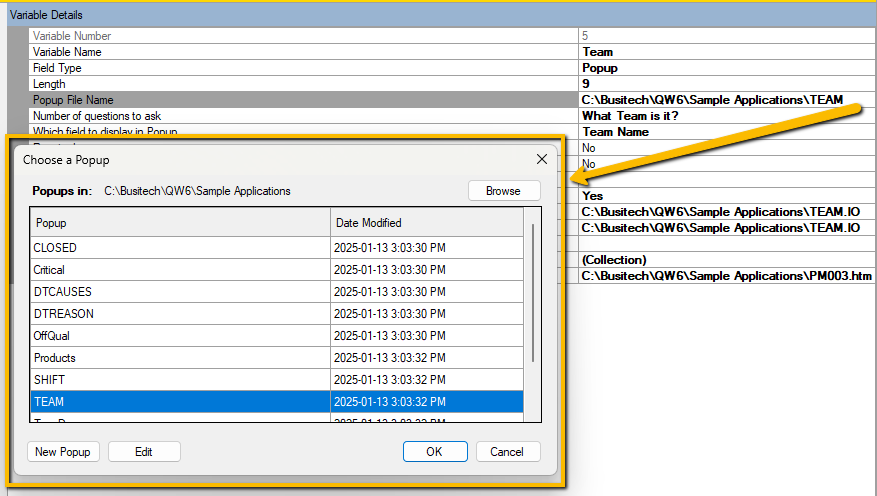
Improved Popup Selection Experience – The popup file selection interface in the QW Applications Editor Console (Maintain/Create Application) has been enhanced. This improvement provides administrators with a more intuitive and streamlined experience when selecting popup.
Resolved Issues
View Limits Reset on Admin Changes – Resolved an issue where custom limits set in views were unintentionally reset after administrators made changes to a QW application in the QW Application Editor Console (Maintain/Create Application).
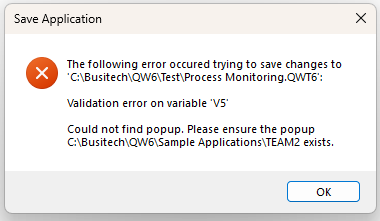
Improved Popup Reference Error Messages – When a QW Application referenced missing popups, the error message displayed was unclear and unhelpful. A clearer message now identifies the problem and specifies the affected variable.
2025-01-09 | Build 6.1.160
New Features and Enhancements
Expand Parent Folders – The Open File dialog now automatically expands all parent folders for the selected folder, streamlining navigation for users managing their QW applications with a folder-based structure.
Hide Popup Keys in Add/Edit Screen – The Hide Popup Keys setting now applies to the Add/Edit screen, ensuring a consistent user experience. To re-enable popup keys, navigate to Tools > Settings, and set Show Popup Keys to “Yes” under the General section.
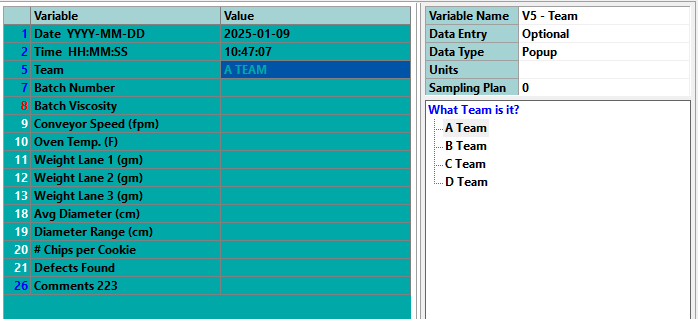
Alarm Shortcut Key – A shortcut key (S) has been added for the Alarm tab, aligning with the shortcut functionality of other tabs.
Home Key Behavior – On the Logsheet tab, pressing the Home key now mirrors the behavior from QW5: it moves the cursor to the first unlocked column and automatically scrolls the view.
Improved Configuration Messages – Error messages in the Views Manager have been refined to provide clearer feedback on invalid configurations.
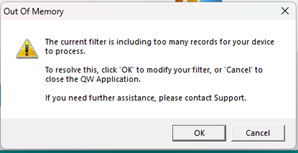
Out of Memory Warning – Users encountering out-of-memory errors due to inappropriate filters when processing large datasets will now see a warning instead of experiencing a crash. This allows users to adjust their filters and resolve the issue independently.
Resolved Issues
Filter Handling – Fixed an issue where certain filter combinations (e.g., date/time selection with variable value filters) unintentionally excluded all records.
Message Log Read-Only Error – Resolved an issue where QW Admin could not save message file contents if the QW Application message file was in a read-only state.
Delete Key on Popup Values – Fixed an issue preventing the Delete key and the right-click menu option from working for popup variable types on the Add/Edit screen.
Locked Variables Hiding Scroll Bar – Addressed a problem where setting too many locked variables in the Logsheet prevented the horizontal scroll bar from appearing on smaller resolution screens. When this occurs, the “Number of variables to lock” setting will now be ignored to ensure usability.
QW Move File Extension Issue – Fixed an issue in QW Move (accessible via QW Admin Utilities) that prevented proper archiving for applications with a .QWT6 extension.
QW Move Default View Handling – Resolved an issue where archiving without selecting a specific view and using a record range could result in unexpected archive of records, depending on the default view configuration. Note: No data was being lost due to this issue.
2024-12-04 | Build 6.1.144
We’re excited to announce Quality Window 6.1.144 – A release specifically targeted at an issue where views with a specific configuration are throwing errors for users, please review 6.1.142 release notes for other recent updates.
Resolved Issues
An error was resolved that occurred when loading some views with specific data signatures that either summarize data or use the hide empty variables option.
2024-11-25 | Build 6.1.142
New Features and Enhancements
Auto-Setting Popup Variable Length: QW Admin now automatically calculates and sets the minimum variable length for popups used in popup/lookup fields. If the length is too small, a warning prompts the admin to increase it to the required minimum.
Open QW Applications Directly from QW Admin: Admins can now open QW Applications they are editing directly from the file menu or a new toolbar button.

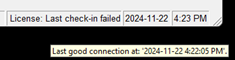
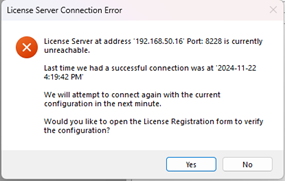
Enhanced Concurrent License Validation: Improved handling of degraded or intermittent network conditions. The system now retries connection attempts for up to five minutes before notifying users of license server issues. The status bar also updates license status during this retry period.
 |  |
Resolved Issues
Record Editor Data Entry Optimization: Fixed an issue where rapid variable data entry caused fields to lag or become unresponsive.
Improved Record Saving Performance: Addressed slow record-saving under certain conditions.
Clipboard Paste Crash: Resolved a crash occurring when pasting data into the Record Editor.
Field Focus in Record Editor: Fixed a bug where focus wasn’t set on the first field when adding a record by clicking the “Add” tab.
Checkbox Keyboard Navigation: Improved keyboard navigation for checkbox variables on the Record Editor screen to align with expected behavior found in QW5.
Edit Record Date/Time Issue: Fixed rendering problems with date/time-formatted text variables in the Edit Record view.
Unexpected Crashes or Closures: Resolved issues causing Quality Window to crash or close without error. The application now displays error messages, aiding troubleshooting.
Large Record Set Handling: Prevented crashes and rendering issues when loading large record sets. A best practice of limiting record counts to 100 is still recommended.
Report Tab Copy Crash: Fixed a crash caused by copying data via the “Edit -> Copy Data” command on the Report tab.
Control Chart Range Whiskers: Corrected an issue with range whiskers for @Pop-calculated variables on control charts.
Erroneous Admin Change Notifications: Fixed spurious admin update notifications in degraded network conditions.
2024-10-28 | Build 6.1.120
New Features and Enhancements
File Filtering for Open Dialog and Directory Files – Responding to customer requests, we’ve added keyword-based file filtering for both the open dialog and directory files. This allows users to quickly find applications by using keywords and enables organizations to use Directory files as a security measure to restrict access to specific applications. The filtering applies to both the title and filename columns.
Last Folder Memory in Open Dialog – The open dialog in QW Workstation and QW Admin now remembers the last accessed folder instead of defaulting to the primary data directory. The folder reverts to the default data directory when Quality Window is restarted. Click the home icon to return to the default folder quickly.
Optimized Logsheet Performance – We’ve improved Logsheet loading speeds, particularly noticeable when handling applications with numerous variables and/or records.
New Security Permission for Tools and Utilities – Customers wanted more control over the tools and utilities area of the QW Admin. We therefore added a new permission called “Access Tools and Utilities” which gives a consistent security model across all of the QW Admin capabilities.
Save Application View as option requires security permissions – QW Workstation now respects the permission “Manage Applications” for the File menu option “Save Application View as”. This was implemented to respect organizations that need to control who can create QW Applications.
Automatic Audit Log Generation – QW Workstation now auto-generates log entries for applications lacking configured audit logs, eliminating the need to verify logging status manually in QW Admin.
Self-Healing for Mismatched Log Files – QW Admin identifies and corrects log files saved in incorrect locations or with unexpected filenames, ensuring audit logs are accessible and consistent with the application’s structure.
Spec Manager Filter Improvement – Blank values in Spec Manager now appear as “(Blanks)” during row filtering, enhancing clarity and aligning with industry standards.
Help Access on Add Screen – The Application and Variable help features are now accessible directly from the Add Screen, providing easy support while entering new data.
Resolved Issues
Column Header Visibility – Fixed an issue where column headers were cut off. The calculation now considers the largest width between the column header or variable character length.
Limit Colors in Large Record Sets not showing – Limit colors are now visible even when displaying more than 33,000 records. (Note: for optimal statistical relevance, we recommend a maximum of 100 records.)
F-Key Unresponsiveness – Resolved an issue where the F-Key shortcuts (F8, F9, F10) occasionally became unresponsive on the Add Screen.
Spec Manager Auto Archive – When administrators modify applications, Spec Manager now automatically archives the state prior to changes.
Excel Data Pasting in Spec Manager – Addressed an issue where pasting from Excel into Spec Manager caused errors.
Focus Save Issue in QW Admin Grid View – Corrected a problem where in-focus changes were not saved in Grid View when using the toolbar save button.
Copy and Paste Hotkeys on Add Screen – CTRL+C and CTRL+V hotkeys have been restored. CTRL+SHIFT+V now pastes without formatting.
Relative Path Normalization – Enhanced file referencing by displaying and storing only filenames (instead of full paths) when files are in the same folder as the application, making application migration easier.
Validation Warning Crash – Fixed a crash that occurred when attempting to save changes after a validation warning.
Lowercase Extensions in Application Renaming – Resolved renaming issues with lowercase extensions (“qwt,” “qwt6”) in QW Admin.
Shared Configuration Permissions Handling – Quality Window now provides error messages instead of crashing when encountering misconfigured shared configuration permissions.
Rename Application Stability – Additional safeguards have been implemented to prevent renaming errors caused by concurrent user access.
Date Filter in Views – Fixed an issue with specific date filters failing to load in views.
Pasting in protected fields – Fixed an issue where users could circumvent protected fields by using the windows paste operation.
2024-08-12 | Build 6.1.85
Resolved Issues
Fixes for Scripts
Current Record issue – in some rare cases when pulling the current record from the QW Repository object in the Quality Window API, the current record is not updated to the latest added record causing issue with script record updates. This issue has been resolved as part of this release. If your team has questions about this update, please contact support@busitech.com.
2024-08-02 | Build 6.1.83
Resolved Issues
Fixes for Views
View File encoding issues – A rare issue was resolved where if special characters where in a variable file name, QW Admin would encode the files in a way that can create visual issues for variables in QW Workstation.
Remove saving of Units of measure in Views – The ability to edit units of measures in views was removed to simplify the user experience and prevent other issues related to inconsistent data.
Previous version reports not properly configured – An issue was resolved where when opening a view that was created in Quality Window 5 the report configuration was lost in some cases.
QW Administrator Fixes
Spec Manager Crashing – In 6.1.78 a new bug was introduced where spec manager module was not loading correctly for some users. This issue is now resolved.
Merge File issue – In 6.1.78 an issue was introduced where when opening merge applications that were created in QW5 references for the merge application were not properly loading forcing users to rebuild their merge applications. This issue has been resolved.
2024-06-27 | Build 6.1.78
New Features and Enhancements
New Security Database File Update
IMPORTANT! – Due to repeated issues introduced by Microsoft and their windows update service which impacts the stability of Quality Window installations, this version introduces a new database file system for the security database. Our installer will migrate user accounts automatically to this new system, and it requires customers that are currently using the security features, specifically user accounts, to ensure that all instances of Quality Window are updated with this version. This is to ensure that changes to security settings and user accounts are visible to all devices. See our Security Database Update page for more details.
Improved Integration with QW License Server
Improved responses for Concurrent Licensing – QW Admin and QW Workstation are now more efficient and clearer when interacting with the QW License server. This will remove unnecessary log entries on the License server and provide more detailed version information allowing organizations to leverage QW License Server to identify non-compliant devices with out-of-date versions. These updates also provide more feedback related to connection issues to the end user when trying to connect to QW License Server.
Auto Discover QW License Server – The licensing console in both QW Admin and QW Workstation now supports QW License Server Auto discovery capability, allowing users to scan for a QW License Server instance on the network by clicking “Auto Discover” button and not having to enter server details. This may not work in some network configurations.


QW Admin
New Icon for QW Admin – The QW Admin icon has been updated to help users differentiate between QW Workstation and QW Admin.

Load Remote Configuration for shared configuration – In this release, The QW Admin – Shared configuration console can now initiate a download of the shared configuration settings from QW License server if set for a product item. This can be completed by click File -> Load Remote Configuration.
Removal of Debug Tracing – It was determined that the Debug tracing tool was no longer required as part of the QW Admin experience due to performance impacts. This support capability is still available through other tools that are available in the platform.
Added Email Server settings – In organizations that have internal mail servers (SMTP servers) that don’t require user credentials or use self signed certificates will now be able to configure their email configuration settings to support these SMPT configurations. These settings should only be used with support from your IT departments.
| New Setting | Description |
| Ignore certificate errors | Enable this setting if your IT department instructs you that the SMPT server uses a self signed certificate. This should only be set on trusted SMTP servers. |
| SMTP server does not require credentials | Enable this setting if your IT department instructs you not provide username and password credentials when sending emails from Quality Window through an internal SMTP server. |
QW Workstation
Improved labeling of Shared Configuration Features – in an effort to improve the clarity and purpose of QW workstation’s ability to request an update for shared configuration from the QW License server the following label changes have been made
| Old Label | New Label | Location | Function |
| Update Shared Config | Download Shared Configuration | Tools Menu | Initiates a download latest shared configuration settings from the QW License Server if configured. |
| Auto Update Shared Config | Use Remote Configuration | Tools -> Settings dialogue | When set to yes, forces QW Workstation to update its shared configuration from the value on the license server every time it is opened. |
Removal of Debug on startup – It was determined that the Debug tool was no longer required as part of the QW Admin experience due to performance impacts. This support capability is still available through other tools that are available in the platform.
Ability to open Locked QW Applications – QW Applications that are integrated to an external data source such as excel files or SQL databases are locked when opened by a user. This prevented other users from opening the same application due to how Quality Window handles these external data sources. In this version, when one of these types of QW Applications are locked by a user, subsequent users will be permitted to open a temporary copy of the QW Application. When opened in this temporary mode, any changes to views will not persist after closing the application due to it being a temporary copy.

Improved Open Application performance – In an effort to continue to address performance issues in degraded network conditions, the open application dialog is now even simpler and only shows the application file name and no longer displays file size, file path and modified date/time. To view application details just check the “Show Application Details” checkbox to display fields.


Resolved Issues
QW Workstation
Log in prompt passing extra enter/return keystroke to Add screen – An issue was resolved where when a user is prompted for credentials when adding/editing a record, an extra enter key is sent to the application which can impact the editor where values can be auto selected in popups.
Subscript out of range error – In rare cases when users are opening multiple QW applications, a subscript out of range error occurs which has been resolved with this release.
Focus issue after resuming Application – When resuming QW Workstation in the middle of an add or edit of a record, Quality Window would require the user to re-enter a field that was already being edited. In this release when resuming the application your focus field will be preserved allowing users to continue interacting with the field.
2024-05-14 | Build 6.1.47
Introducing Seamless Quality Window 5 support
Quality Window 6 now supports Quality Window 5 data format seamlessly and now allows customers to install Quality Window 6 and immediately transition without the need to migrate their data. See Quality Window 6.1 Upgrade guide for further details on the upgrade.
For customers already using Quality Window 6, the only difference this update will have on your experience is quality window data files will now use the quality window 5 file extensions by default. Any existing quality windows 6 files will continue to work as is with their existing file extensions without issue.
Workstations users can now open Quality Window 5 files in Quality Window 6 without issue, benefit from supported software and Quality Window 6’s new capabilities.
Administrators, users can manage their Quality Window 5 applications immediately without worrying that they will break compatibility with Quality Window 5. The only exception to the seamless experience is scripts and macros. Please see our Upgrade guide for further details.
What does this mean for existing Quality Window 6 customers?
There should be no impact to existing customer deployments. QW6 customer will notice we are no longer saving files with the QWT6|QWD6|QVM6 ect… extensions and this version is now saving the same extensions as QW5.
The exception to this is the global script, for reasons related to protecting the existing QW6 customers, this is left unchanged at QWX6.
Any existing application with the 6 series extensions will continue to work as is and do not require migration or special handling.
Script Updates
As an admin of existing QW6 deployments, if any of your scripts reference older references, you will be prompted to upgrade them when the application is opened in admin. It is recommended to do this, though not critical. See section below on Script Editor improvements for more information.
New Features
Email Notifications for Rule Violations
In this version Busitech has added a new capability that allows organizations to get email notifications when a Rule violation occurs on a record update. See our Email Notification Administration Guide for all details about this new feature.
QW Workstation Improvements
Performance improvements
Busitech has invested considerable time to improve the performance of Quality Window and in some cases, users may see an increase of close to 30% in load times.
Open Application Dialog
Open Application Performance improvements – In some customer configurations where a network folder has hundreds of applications, the open application dialogue can take a long time to load or even lock up. Even though Busitech would guide customers towards more organization of their applications as a best practice, especially on a network, we have removed the application title unless the user has the show application details checked which will decrease the network load when on this screen.
QW Admin
Manage Applications Improvements
Improved Deleting referenced Variable Experience – When deleting a variable that is referenced elsewhere in the application (calculations, lookup, general setting etc.) the following experience improvements have been added:
- To ensure clarity, the deletion of multiple variables was removed. Administrators now must delete 1 variable at a time.
- When a variable that is referenced is deleted, an error message will be displayed indicating the variable is referenced and where it is referenced. This allows administrators to go and update the reference.
- When a variable that is referenced is deleted the variable reference panel will automatically be enabled allowing the administrator to view all references for the selected variable.
Manage Rules Improvements
Email Notifications – In this release, notifications were added to rule definitions, enabling administrators to optionally configure email notifications for rule violations. . See our Email Notification Administration Guide for all details about this new feature.
Save Rules confirmation – a save confirmation dialog was added notifying administrators that rules configuration has been successfully saved.
Rule Identifier Locked – It was discovered that when editing rules, if a rule identifier is edited to a different value, that there may be undesirable consequences based on customer feedback. To avoid confusing impacts, Busitech chose to make Rule Identifiers read-only once set. If an administrator needs rename a rule, they should delete the rule and create a new one.
Quality Window Security Improvements
Manage Configuration Permission – In this release, a new permission was added to the QW Administration to provide more governance options to customers. The new “Manage Configuration” permission limits access to the following Shared Data and Scripts administration consoles:
- Directory Files
- Manage Units
- Manage Statistics
- Manage Rules
- Script Editor
- This will only limit editing Global and folder level scripts and does not prevent application specific script editing.
- Shared Configuration
With this update, the following administration consoles have been moved to the applications section to aid with usability and clarity for administrators:
- Manage Popups
- Spec Manager
The Query License Server console was moved to the Tools and Utilities section to further align the sections with specific security permissions.
The following table describes which permission is required for each administration console
| Section | Option | Permission Required |
|---|---|---|
| Applications | Maintain Application | Manage Applications |
| Applications | Create Application | Manage Applications |
| Applications | Manage Popups | Manage Applications |
| Applications | Spec Manager | Access Spec Manager and Manage Applications |
| Shared Data and Scripts | Directory Files | Manage Configuration |
| Shared Data and Scripts | Manage Units | Manage Configuration |
| Shared Data and Scripts | Manage Statistics | Manage Configuration |
| Shared Data and Scripts | Manage Rules | Manage Configuration |
| Shared Data and Scripts | Script Editor | Manage Configuration |
| Shared Data and Scripts | Shared Config | Manage Configuration |
| Shared Data and Scripts | Security Administrator | Manage Security |
*NOTE: if no defined user is given a specific permission than the permission is considered not enabled and all users inherit the permission.
Support for NLog logging – To improve traceability, Busitech has added initial support for NLog. This will allow customers in a regulated industries to connect Quality Window Logging to external log consuming applications.
Transaction Log File now static – Due to customer feedback and issues where customers did not have transaction logging properly configured or having multiple QW Applications logging to the same file creating corruption or mismatched entries, Busitech has made Transaction log files static to the same file name as the QW Application and in the same folder. Administrators will be notified of this change when it impacts an application.
Quality Window Script Editor Improvements
As part of this release, the Quality Window Script Editor has undergone many improvements that apply to both the global script editor and the Application script editor to make it easier for script developers.
Auto Comment on Script Edits – Now when an administrator edits a script in the script editor a comment is added to the top of the script indicating who updated a script and when.
Example: ‘ [2024-04-20 4:27:00 PM] – Modified by Kelly On machine KellyLaptop
Updated File menu items – The Script Editor’s file menu has been updated to make it easier for common script tasks.
The below table describes each of the file menu options.
| Menu Item | Description |
| New Folder Script | Prompts user to choose a folder and a new Folder Script (QWScript.qwx) will be created in that chosen folder and be used by any application that is stored in this folder when saved. *If a script already exists, the user will be notified of the existence and the existing script will be loaded instead. |
| New Application Script | Prompts user to select an application and a new script created and added to that application (<applicationFileName>.qwx) when saved. *If a script already exists for the application, the user will be notified of the existence and the existing script will be loaded instead. |
| New External Script | Will create a new external script. User will choose filename when saving the script using the “Save Script” menu option. *External scripts are scripts that don’t interact with an application directly instead are used with other tools such as QWAdd.exe. |
| Open Global Script | Opens the currently configured global script based on your shared configuration settings. |
| Open Folder Script | Prompts user to select a folder, if a script exists, it will be opened in the editor. |
| Open Application Script | Prompts user to select an application. If Application has a script, the script will be opened in the editor. |
| Open Sum Stat Script | Opens the Sum Stat script in the editor. |
| Open External Script | Prompts the user to select an external script on the file system. |
| Save Script | Saves the script to the appropriate location. |
| Exit | Exit’s Script Editor |
Auto Update of QW5 Script References – With the added seamless Quality Window 5 support, when an administrator opens any script with QW 5 references, the Script Editor will prompt the user with an “Outdate Script Reference Detected” message allowing the user to optionally auto update the script to the latest Quality Window 6 references.
Yes – If yes is selected, all references in the table below will be updated to their Quality Window 6 equivalent. A comment will also be added to the top of the document indicating the script was migrated. The added comment should not be removed as it also improves performance as it will tell Quality Window to not have to support QW5 references.
***Note: Once upgraded, these scripts will no longer work and may error our in Quality Window 5. If QW5 support is needed while you upgrade, select “No” option until your entire deployment is upgraded to Quality Window 6.
Example comment:
‘ ********************************************************************************************
‘ [2024-04-03 4:15:22 PM] #QWSCRIPT:V6_REFERENCES_UPDATED# – Script references automatically updated by kelly on machine KELLYSURFACES (do not remove)
‘ ********************************************************************************************
No – If no is selected, the script will remain unchanged. Quality Window will still work with the old references because the product magic replaces Quality Window 5 references with the updated QW6 versions.
| Quality Window 5 Reference | Quality Window 6 Reference |
| QWAccessClass | QWAccess60 |
| QWAccessClass.QWAccess | QWAccess60.Connection |
| QWTool | QWTool60 |
| QWTextClass | QWText60 |
| QWLogView | QWLogView60 |
| prjQWSelect | QWSelect60 |
| QWLicense | QWLicense60 |
| QWRep | QWRep60 |
| QWComSrv | QWComSrv60 |
| QWSQL | QWSQL60 |
Resolved Issues
QW Workstation
Add Screen Fixes
Named the Add screen, this reference infers the user experience for add, edit, copy and insert.
Add Screen focus issue – An issue was resolved where in some cases after user get a validation warning on the add screen, they were unable to properly regain focus to the variable to enter a corrected value.
Add Record focus issue – When Add Record function was initiated, the focus would be placed on the selected column on the logsheet instead of the first editable field. This has been resolves.
Add Screen Missing Highlight – In rare cases, the current variable would have focus but the highlight would not be shown to the user which is now fixed.
Add Screen Subscript out of Range – In some cases when multiple QW applications were opened a bug was resolved that would throw an error on add or edit screen, forcing the user to restart Quality Window to clear the error.
Add Screen Required Indicator color issue – The add screen colors that render on the left side of variables indicating if a variable should require a value based on the required and sampling plan properties was not working correctly and has been fixed. See below for table indicating how it works.
| Required | Sampling | Has Value | Color | Definition | Mandatory |
| Yes | 0 | No | Red | No sampling. | Yes |
| Yes | 1 | No | Red | Always sample. | Yes |
| Yes | > 1 | No | Red | Sampling value requires user to enter a value. | Yes |
| Yes | > 1 | No | Blue | Sampling value dictates that the user is not required to enter a value. | No |
| No | 0 | No | Blue | No sampling, not required, | No |
| No | 1 | No | White | Always sample. | No |
| No | > 1 | No | White | Sampling rule says you should enter data. | No |
| No | > 1 | No | Blue | Sampling rule say you do not need to enter data. | No |
| Any | Any | Yes | Blue | Entry rule fulfilled | N/A |
New Line characters inserted in add screen – It was found that users that user could insert invalid new line characters into variable value by pasting from clipboard, using the CTRL+ENTER key combination or using SHIFT + ENTER key combination. This would result in a malformed transaction audit file and other symptoms. With this release it is no longer possible.
Edit Smart Focus broken – in the last release of Quality Window, when initiating an edit record operation, the user wasn’t automatically placed on the variable that was selected in the logsheet. The feature is now working as expected.
Jumping Variables after entering values for an Average Variable Type – When users were using the keyboard to enter the values for variable of type “Average” the variable focus would skip after completing the entry. This issue has been resolved.
Popup Crashing when adding records – In some rare cases where Popups were improperly defined, quality window would crash when adding records. The crash is now being prevented and an error is being displayed to the user indicating the detected issue with the popup definition.
Logsheet Fixes
Column width issue – If an admin defined a variable to have a length of 1, the column width was too small to read the variable name. This issue is now resolved and will render columns ensure that the variable name is always readable.
Trieto Screen Fixes
Improper rendering of charts for Popups – In some cases on the Trieto screen, the charts were not charting correctly when QW workstation is configured to not show popup keys. Now the charts will render correctly regardless of the Show Popup Key setting.
Open Application Dialog Fixes
Incorrect rendering of dialog tabs – In some cases Quality Window would render the tab contents incorrectly on the open application dialog where the “Existing Applications” and the “Recent Applications”. These tabs now work as expected.
QW Admin
Updated Icons – The QW Admin experience was updated to remove generic icons in favor with a more relevant icon.
Manage Applications Fixes
File Pack menu option not working as expected – The File Pack option in QW Admin Manage Application console would open File Pack instead of just packaging the current application. This issue has been resolved.
Manage Units Fixes
Toolbar not always working – It was discovered that in some cases the toolbar ceases to work in the Manager Units admin console. The toolbar now works as expected.
QW Installer Fixes
Multi Lingual windows user groups – An issue was resolved where if default windows user groups were translated due different language edition of windows, permissions were not properly set.
QW5 Configuration Migration – In an effort to help with upgrade to Quality Window 6.1, the installer has a new post install process that prompts the user to migrate these settings if QW5 is detected on the device. See QW 6.1 Upgrade Guide for more information.
2024-01-30 | Build 6.00.735
Rename Application Improvements
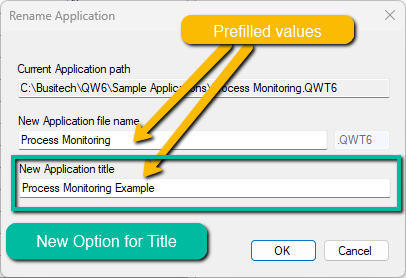
- Rename Application Title – We’ve improved the ‘Rename Application’ feature in the Quality Windows Administrator. Previously, administrators had to remember to rename the application in the general application settings as the title was not an option in the initial rename operation. Now, administrators can easily rename the application title as part of the initial rename operation.
- Rename Application Value Prefill – As part of the improvements to the ‘Rename Application’ feature, we’ve made it easier for administrators to rename applications. Now, the title and file names are pre-filled with the current title and file name during the renaming process.
Administration Logging Improvements
- Improved Log Entry for ‘Save Application As’ – We’ve enhanced the log entries for the ‘Save Application As’ function. Now, when an administrator saves an existing application under a new name and/or location, the log entry clearly indicates that the new application was created from an existing one. Additionally, we’ve ensured that the logs of the existing application are preserved by copying them over during the ‘Save Application As’ process.
- Improved Log Entry for ‘Renamed Application’ – We’ve also improved the log entries for the ‘Renamed Application’ function. When an administrator renames an application, a new log entry is added to indicate that the application has been renamed.
- Improved Log Entries for ‘Chart Screen Options’ – We’ve made enhancements to the log entries for changes to application chart screen options. These entries were previously unclear, but have now been improved for better clarity.
Transaction Audit Logging Improvements
- Expand/Collapse Nested Rows – We’ve added a new Transaction Audit feature to the Quality Window workstation. This feature allows users to easily expand and collapse all nested records using new toolbar buttons.
- Row Highlighter – We’ve enhanced the user interface by adding a blue highlight to selected rows. This feature facilitates analysis in applications audit records that require horizontal scrolling.
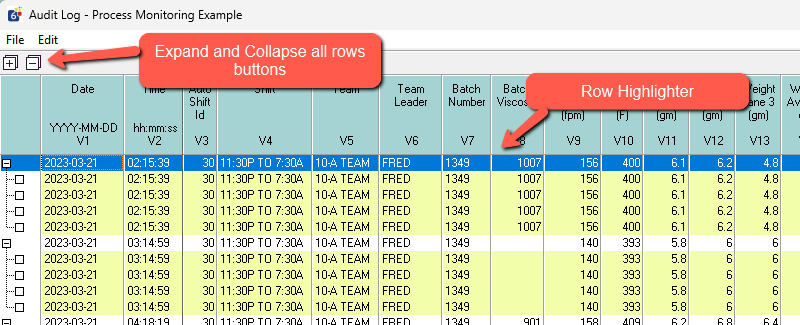
Security Improvements
- Network Security Caching – This feature is designed for scenarios where customers experience performance issues related to Quality Window Security on their networks. In this version of Quality Window, administrators have the option to enable caching. This function temporarily stores security data on workstations, potentially improving performance. However, it’s important to note that if user accounts are altered, clients using the caching feature will need to restart their Quality Window applications to reflect the updated security changes. To enable this feature, in Quality window workstation navigate to Tools ➡️ Settings and enable the “Cache security DB locally” setting in the general section.
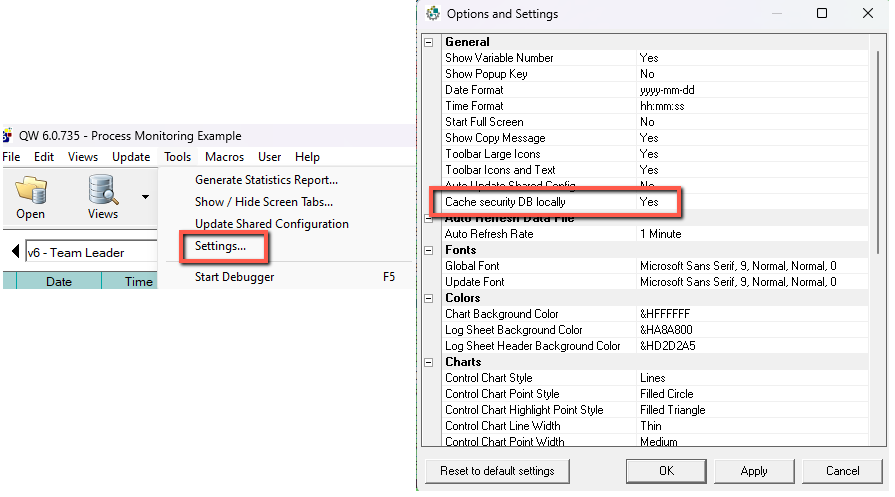
Resolved Issues
- QW Batch Move Utility QW5 template issue – We’ve resolved an issue where an error was occurring when opening Quality Window 5 applications in the QW Batch Move Utility.
- QW Merge Warning Dialog Issue – We’ve addressed an issue where a Windows update affected the display of the QW Merge warning dialog. This issue occurred when a saved merge application attempted to load an application that had been modified since the last save. We’ve now updated the warning message to ensure it displays correctly.
- Application Renaming Issue – We identified a problem where renaming an application was causing an error under certain circumstances. This issue has now been resolved.
- Directory Files Help Issue – We’ve resolved an issue where the help link for the Directory Files feature was not directing users to the correct knowledge base article.
2024-01-08 | Build 6.00.734
- Popup Editor Lost and Locked: Resolved an issue where the Popup Editor would become unresponsive and lock the Quality Window Administrator application.
- Extra un-needed Audit log Entries when Saving an application: Removed unnecessary audit log entries that were added when saving an application.
- Cannot save Application due to Temp file Conflict: Fixed a problem where temporary files in the Windows temp folder prevented saving applications.
- Security Editor Help Not Opening: Corrected the issue with the non-functioning Help button in the Security Editor.
- Report Type Options Duplicated: Addressed the duplication and missing report types in QW Administrator Manage Applications.
- Application Versioning truncating Trailing Zeros: Resolved an issue with application version numbers misleadingly truncating trailing zeros.
- Chart Screen Options Reversed: Fixed incorrect property updates in Chart Screen Options.
- Cannot Save Application if View File Was Deleted: Resolved a blocking issue related to saving an application when its view file is deleted.
- Directory Files Editor Help not opening Help: Re-enabled help in the Directory Files Editor with access to a video tutorial.
- File Version is Inaccurate in Auto-Generated Change Message Log: Corrected the file version display in the auto-generated change message log.
- Security Options not always saving in Security Administrator: Fixed a rare issue where certain security options were not saving correctly.
- Active X error when adding or editing records to Application: Fixed a bug causing crashes when adding or editing records in Quality Window Workstation.
- Opening via Directory File mode throws Error: Resolved a runtime error when opening an application via Directory File mode.
- Global Macro “Display All Control Charts” not showing Control charts Properly: Addressed an issue with the “Display All Control Charts” macro not rendering control charts correctly.
- Prevent updating QW License Server with invalid shared Configuration: Fixed an issue where invalid configuration values could overwrite valid ones on the Quality Window License Server.
- Scripting: QWRepository.CurrentRecord Function returning incorrect value: Resolved an issue with the QWRepository.CurrentRecord function returning incorrect values in custom scripts.
2023-08-15 | Build 6.00.733
- Fixed QW6Admin not properly upgrading QW5 applications. File not found error on some templates.
- Fixed directory file dialog not loading all files. Duplicate template files were being filtered out of the list on load even when different views were assigned to the item.
- QW6 IO Tester module icon has been restored on the QW6Admin dashboard.
- License server client now performs check in every 5 minutes. This is to reduce network pings to the server.
- Fixed random “Invalid property array index” error when clicking on folder in QW6FilePack.
2023-07-10 | Build 6.00.732
- Updated license server error messages, error recovery, and license evaluation.
- Bug fix: Directory files on open dialog was not opening the correct file.
- Extra validation checks on saved applications in QW6Admin. Test for zero byte template when saving.
- Added error trapping for corrupt and/or invalid template files in QW6FilePack
- Bug Fix: Filter views not being processed correctly outside of Views Manager.
- Disabled progress bars in QW6Merge to resolve runtime errors on Preview
2023-03-23 | Build 6.00.731
- Improved error trapping and resolution for invalid license number when using concurrent licensing
- Bug fix synchronizing template limits with view limits while saving application. Special formatting of fixed valuesmight not compare correctly.
- DEPRECATED: Auto update of shared configuration from license server. Feature was causing confusion andpotentially incorrect mapping of shared resource files.
- Removed option to publish shared files when saving changes to Shared Configuration. Instead, prompt user tocopy files if they don’t exist in the destination folder.
- QW Sql Wizard now looking for additional date data types and allow same field to be used for Date and Timevariables. Format string option for parsing is ignored for date fields.
- Bug fix: XREF and Category values were being lost on Date and Time variables.
2023-02-01 | Build 6.00.729
- Reset the logsheet lock variable to variable 2 if greater than the rightmost column index in the logsheet.
- Fixed Administrator was incorrectly reading and writing UWL value in views when modifying
- Change log and transaction log are now have readonly and hidden flag attributes
- Restore Application in QW6 Admin Dashboard now invokes legacy backup utility
- Trap runtime error when reading corrupted (truncated) View files
- Fixed overflow runtime error in QW6Version
- Updated security read/write to use updated ACE.OLEDB driver
- Fixed the Exclude Empty Variables option in Views not being applied when executed.